
Where are you in the design process?
A designer choosing a direction and a technical designer moving a seam need different things from their software. Here is where to start, depending on the work in front of you.
- Concept visuals: Check whether the images communicate your direction for design review. The fashion design apps guide also covers drawing, 3D, and pattern tools.
- Editable flats: Try changing a pocket, seam, or trim in your editor. See the hoodie SVG research and the Illustrator-to-tech-pack guide for practical examples.
- Tech packs: Review views, materials, construction, and measurements, then open the export where it will be used. Learn what goes into a spec sheet or compare AI tech pack software.
- Collection planning: Check how the selected direction and its information reach your development team.
- Sample review: Compare received measurements with the original spec and record changes for the next sample. The design-to-sample case follows a garment through physical review.
Compare AI fashion tools by output
Six tools, the work they describe, and something to try on your own style.
| Tool | Consider it when you need | Try this on your own style |
|---|---|---|
| Adobe Firefly | Creative generation and editing across images, video, audio, or vector assets. | Create an asset, then open it in the app where you plan to edit it. |
| NewArc.ai | Sketch-to-image or image-to-sketch work; Sketch Trace advertises editable SVG. | Open the SVG and change a seam, pocket, or other detail in your editor. |
| Onbrand AI Design | Concepts and variations alongside collection and line planning in Onbrand's PLM workflow. | Choose a direction and see how its details reach your development team. |
| Raspberry AI | Editable tech pack pages with flats, callouts, points of measure, and bills of materials; per-page PDF, PNG, or JPEG export. | Regenerate a view, review the flagged sections, and open the exported pages. |
| The New Black AI | Design imagery and an advertised tech pack with flats, size charts, grading, BOM, and PDF. | Check the grading against your standards, see which details you can edit, and open the PDF. |
| AI Tech Packs | Editable tech pack drafts and PDF or Excel exports, flat sketches, and fit sheets for sample measurements and comments. | Revise a flat and a specification, export the tech pack, and try recording fit feedback. |
A closer look at each tool
Adobe Firefly: creative assets and exploration
Adobe Firefly works across several creative media and connects with Adobe applications.
NewArc.ai: from sketch to visual and back
NewArc.ai describes sketch-to-image and image-to-sketch workflows, plus Sketch Trace for converting raster drawings to editable SVG.
Onbrand AI Design: collection direction
Onbrand AI Design presents concept generation and iteration from inputs such as text, sketches, and photos, alongside moodboards, collections, and line plans. Its offering sits within Onbrand's own PLM workflow.
Raspberry AI: editable technical pages
Raspberry AI's tech pack announcement describes editable pages built from garment images and references, with flats, callouts, points of measure, and bills of materials. The announcement also describes regenerating individual views, flags for sections that need review after an edit, and per-page PDF, PNG, or JPEG exports.
The New Black AI: design and technical outputs
The New Black AI describes design visualization and advertises an AI tech pack feature including flats, size charts, grading, a bill of materials, and PDF output.
AI Tech Packs: draft and review a tech pack
AI Tech Packs specializes in tech packs and is evolving toward a PLM system for the full product-development lifecycle. Teams can generate flat sketches, edit tech pack drafts, and export them as PDF or Excel. Flat sketches are available as PNG and, for supported garments, beta SVG. Fit sheets bring sample measurements and fit comments into the development process.
An editable hoodie example
If you need an editable flat, a small change can tell you a lot about the file. In our flat-sketch SVG research, we followed one hoodie from a hand-drawn reference to a generated PNG and then to a beta SVG. The PNG was the reference for the conversion stage.
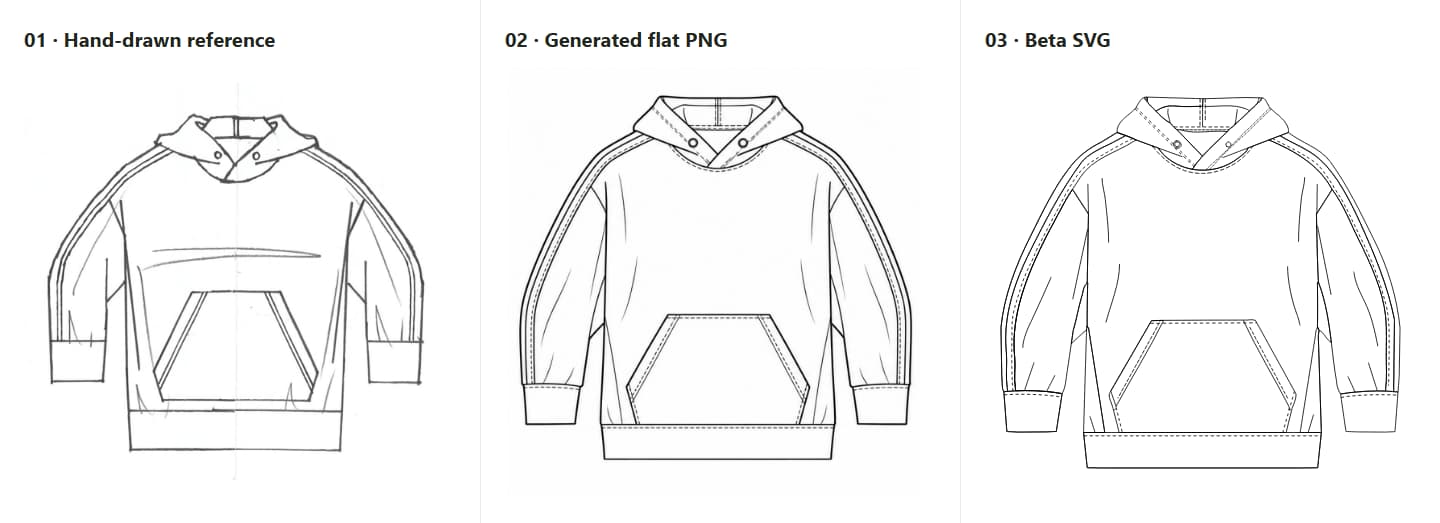
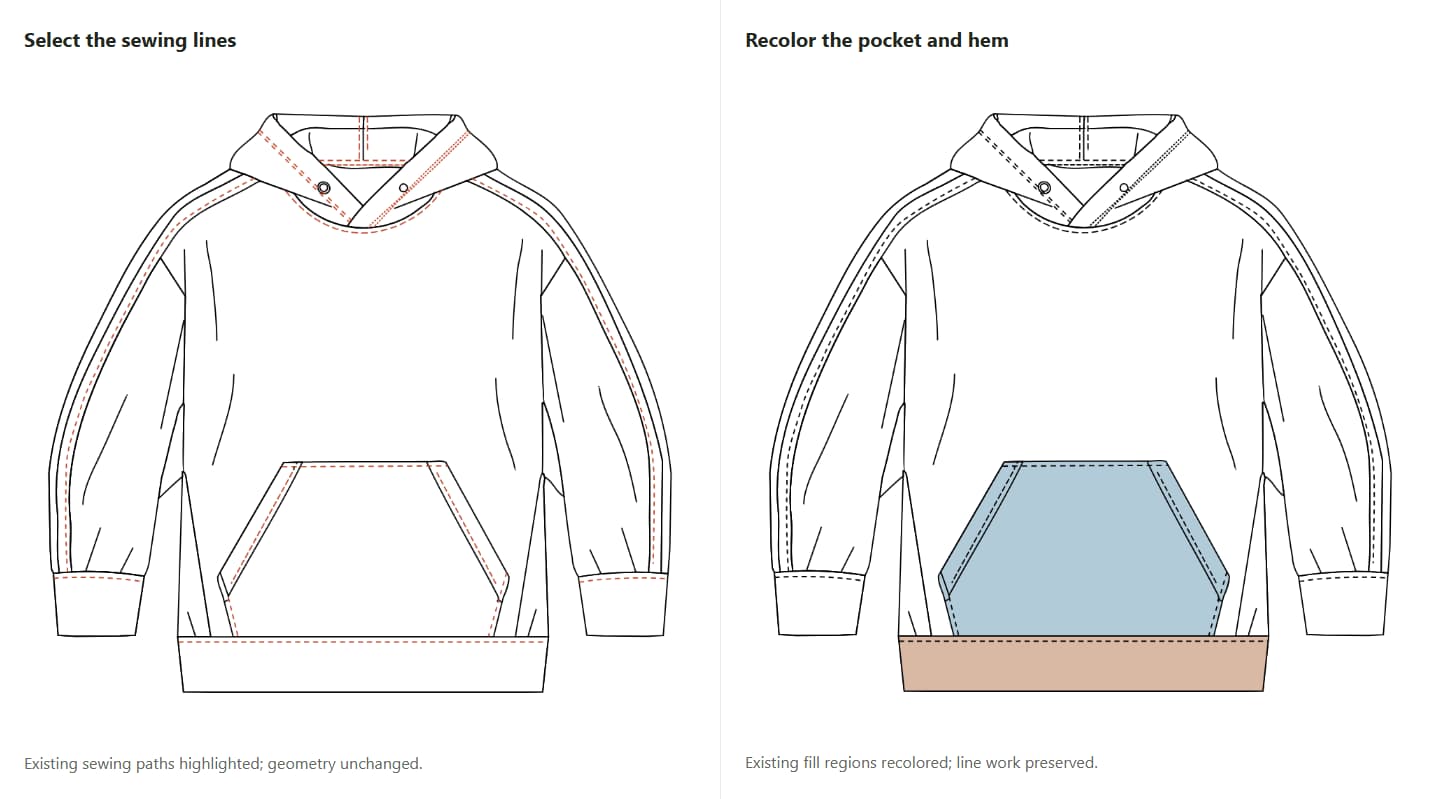
In that example, the SVG separated sewing lines and garment components into groups. We highlighted and hid the sewing-line group, then recolored the pocket and lower hem without redrawing the geometry. We inspected those edits on this hoodie; another garment or input may behave differently.
For a drawing you already have in Illustrator, our Illustrator-to-tech-pack guide covers preparing the drawing for technical documentation. Our design-to-sample case follows a garment beyond the screen to a physical sample.
From tech pack to sample review
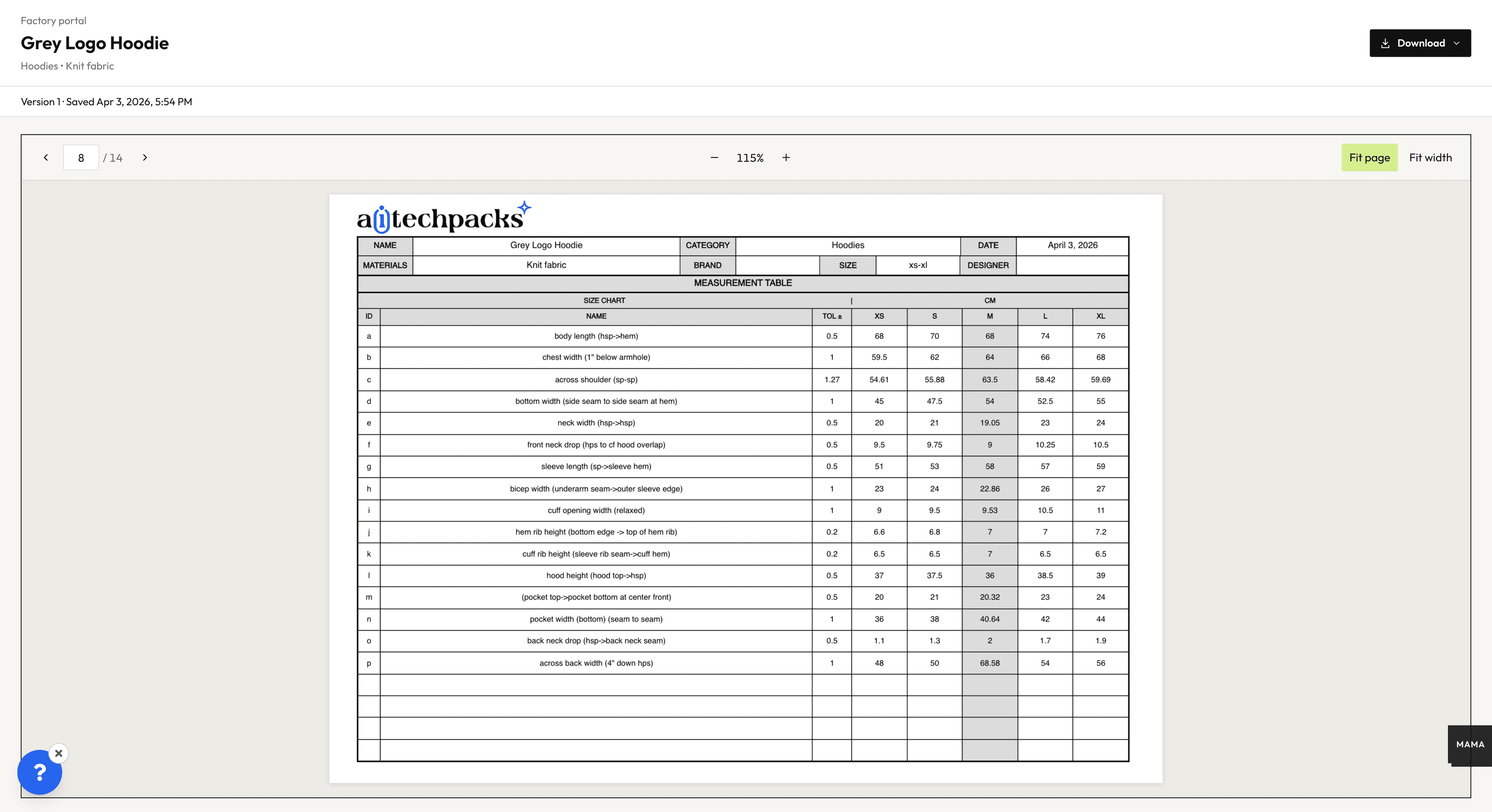
The drawing is only part of the work. A tech pack also carries the measurements and construction details a factory needs. These AI Tech Packs screens show a different style from the SVG example: the Grey Logo Hoodie.
Tech pack development
The measurements table gives the factory a reference for the intended dimensions. Before sharing it, a technical designer can check the points of measure and values against the design.
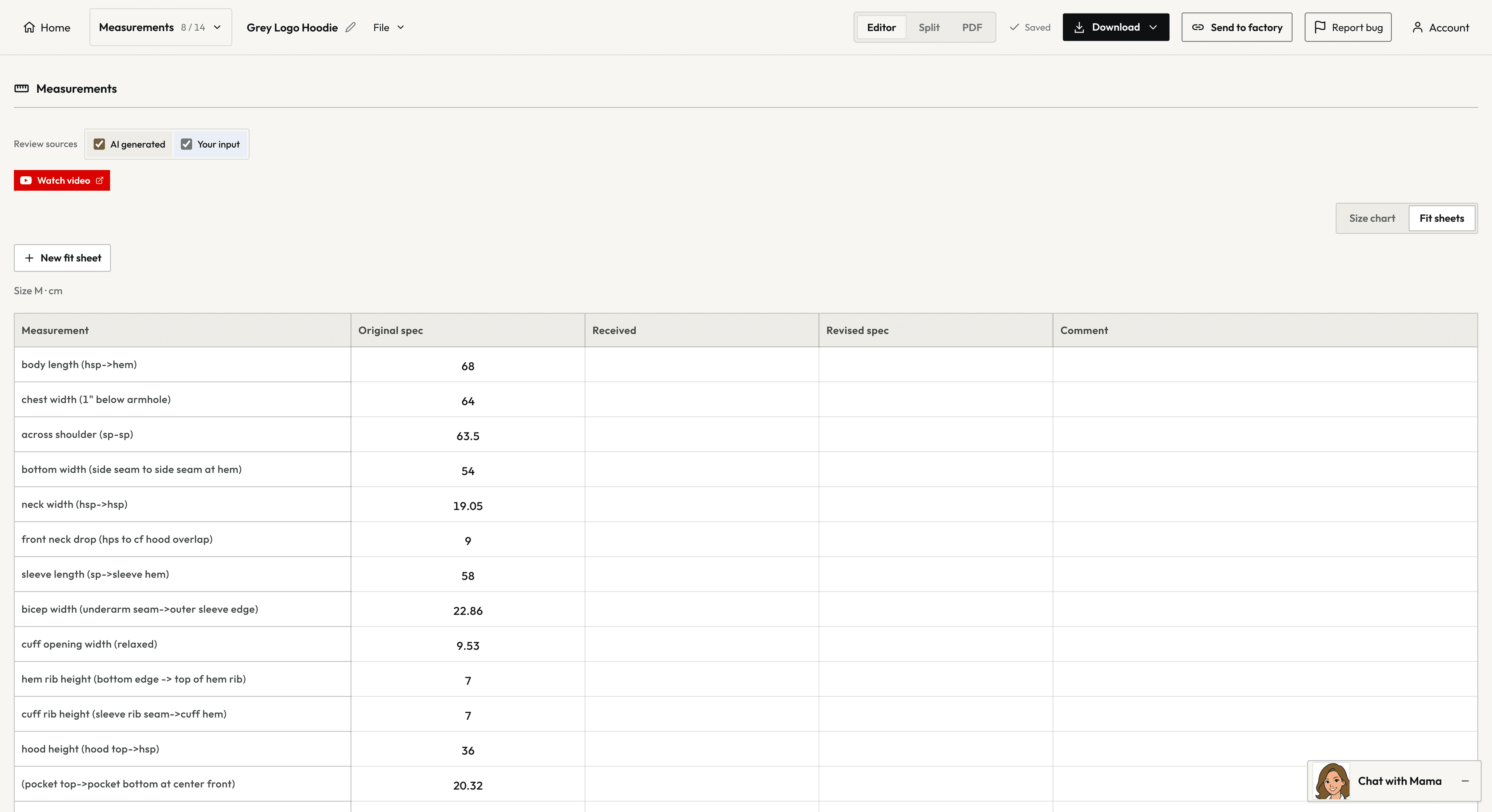
Fit sheet and sample review
When a sample arrives, the fit sheet gives the team a place to compare received measurements with the original spec and record revised values and comments for the next sample.
Try the tools on a real style
Pick a familiar style and a change you would make anyway: move a pocket, adjust a seam, or update a measurement. Give the same brief to the tools you are considering for that job.
Look at what comes back with the person who will use it. Can they make the change without starting over? Are the front and back views, trims, stitching, and callouts right? For a tech pack, have a technical designer check the measurements, materials, construction, and grading before it goes to a factory.
Open the exported file in the software you use and note the corrections and manual work still needed. If your team makes garments with very different construction, a second style can reveal different issues. For a wider look at document management and production, see the tech pack software comparison.
Frequently asked questions
What are AI fashion tools used for?
They help teams explore concepts, present designs, create drawings, and draft technical documents, depending on the product.
Can AI fashion design software create a tech pack?
Some products advertise tech packs or editable technical pages. Their contents and editing tools differ. A technical designer should verify measurements, materials, construction, and grading before a document goes to a factory. See the AI tech pack software guide for a more focused comparison.
Is an AI-generated flat sketch editable?
It depends on the file. A PNG is a raster image; an SVG can contain editable paths, though those paths may still need cleanup. Try changing a garment detail in your team’s editor. Our hoodie SVG example shows specific edits on one drawing.
Can a generated image confirm garment fit?
A generated image can show the intended look, but it cannot confirm fit, hidden construction, or how a fabric behaves. Review the specifications and assess a physical sample. The design-to-sample case illustrates a workflow that continues to a physical sample.
Start with your next task
For a flat sketch, explore the flat sketch generator. For technical documentation, see tech pack generation.