
For apparel teams starting with garment photos or sketches, AI Tech Packs is our recommendation for creating editable tech pack drafts and developing them into reviewed production documents. If your drawings and specifications already exist, Techpack Builder or an Illustrator-and-spreadsheet workflow may fit better. PLMBR adds broader product management, while Clothink combines AI design development with tech pack drafting.
Published by AI Tech Packs. We checked the linked vendor information on September 14, 2026. This is a comparison of documented workflows, with examples from our own product; we have not run a hands-on benchmark of every platform.
Compare tech pack software by the work your team needs to do
This shortlist focuses on creating and revising apparel tech packs: the garment drawings, measurements, materials and construction information your manufacturer uses. Each option addresses that work, but they start from different inputs and cover different parts of product development.
| Software | Fit and starting pointChoose it for | What you bring |
|---|---|---|
| AI Tech Packs | Generating and refining tech packs from garment referencesBring: A garment image or flat sketch, your brief and size setup | A garment image or flat sketch, your brief and size setup |
| Techpack Builder | Assembling and editing tech pack documents on desktopBring: Your sketches, specification tables and annotations | Your sketches, specification tables and annotations |
| PLMBR | Connecting tech packs with wider product developmentBring: Product data, team responsibilities and supplier processes | Product data, team responsibilities and supplier processes |
| Clothink | Combining AI design development and tech pack draftingBring: A style with linked mockups, sketches or CAD flats | A style with linked mockups, sketches or CAD flats |
| Illustrator + Excel / Sheets | Keeping direct control of drawings and specification tablesBring: Your drawing skills, templates and garment specifications | Your drawing skills, templates and garment specifications |
Looking for Techpacker? Its current site directs visitors to Techpack Builder for local document creation and PLMBR for broader product management. We explain both so you can compare the relevant workflow.
Which software fits your apparel team?
AI Tech Packs — from garment reference to a working tech pack
AI Tech Packs generates flat sketches, initial measurements, materials and construction details from a garment reference. The resulting pack stays editable. Techpack Mama Prompt QC can compare supported requirements in a stored generation prompt with the current pack, so the team can review findings and apply corrections.
See the AI Tech Packs generation and review workflow
Choose it when the recurring work is turning designs into technical documentation across a line. The product brings draft generation, editing and review into the same workflow, with batch generation available for multiple styles. Your technical team supplies the fit standards, material choices and production decisions that complete each pack.
Techpack Builder — a dedicated editor for existing specifications
Techpack Builder is the desktop option presented on Techpacker’s current website. Its Mac and Windows app combines sketches, tables and annotations in a visual document editor, with reusable templates, local files and offline editing.
Techpack Builder product details
Choose it when designers already have the technical content and want a purpose-built place to arrange and maintain it. This is a practical comparison with an Illustrator-and-Excel document workflow. For a team, establish how shared files, backups and supplier revisions will be managed.
PLMBR — Techpacker’s broader product-management option
PLMBR is the fashion product lifecycle management (PLM) option linked from Techpacker. It describes tech pack creation alongside project timelines, technical-sketch resources, manufacturer coordination and integrations with tools such as Illustrator and Excel.
PLMBR product and team workflow
Choose it when the problem extends beyond making the pack: several people need to coordinate product information and development progress. Compare it through a real team-and-supplier workflow. Its broader scope is a reason to evaluate implementation and integration needs as well as the editor.
Clothink — AI design development connected to specifications
Clothink is a direct apparel-focused alternative. Its tech pack workflow uses linked garment visuals to draft a bill of materials, size chart, construction notes, measurement guides and sketch callouts. Its documentation also describes editable sections, reusable templates, revision history and PDF export.
Clothink tech pack workflow and editing features
Consider it when your team wants design exploration, mockups and specifications in one workspace. Compare the generated garment details, editing controls and revision workflow with your team’s requirements. The useful question is how well those steps support the way your designers develop and revise a style.
Illustrator plus Excel or Sheets — keep your established design workflow
Illustrator gives designers direct control of vector flats and page layouts. A spreadsheet can hold the size specifications, materials and costing tables. Together they form a workflow your team builds and maintains, rather than a dedicated tech pack application.
Adobe Illustrator drawing capabilities
Keep this approach if your templates, drawing libraries and revision process already work well. The reason to add tech pack software is a specific recurring cost: assembling first drafts, repeating style setup or keeping production information consistent. You can evaluate that part of the work without replacing every tool your designers use.
Where AI Tech Packs fits in a collection workflow
A production team needs to keep developing the design after the first draft. A sleeve measurement changes, a fabric is replaced, or the next style needs the same size setup. Our focus is the work between the design reference and the version your team is ready to send to a manufacturer.
- Generate from the garment. Start with a photo, sketch or flat, add the brief and size setup, and create a draft containing the drawings and specifications.
- Develop the drawing and the pack. Edit the measurements, materials and construction details. For supported garment types, our live SVG beta focuses on selectable garment components, grouped sewing lines and colorable fills.
- Carry the process across the line. Batch Workspace supports up to 10 styles with shared defaults and per-style settings. Review each result, save approved changes, then export or share the current pack.
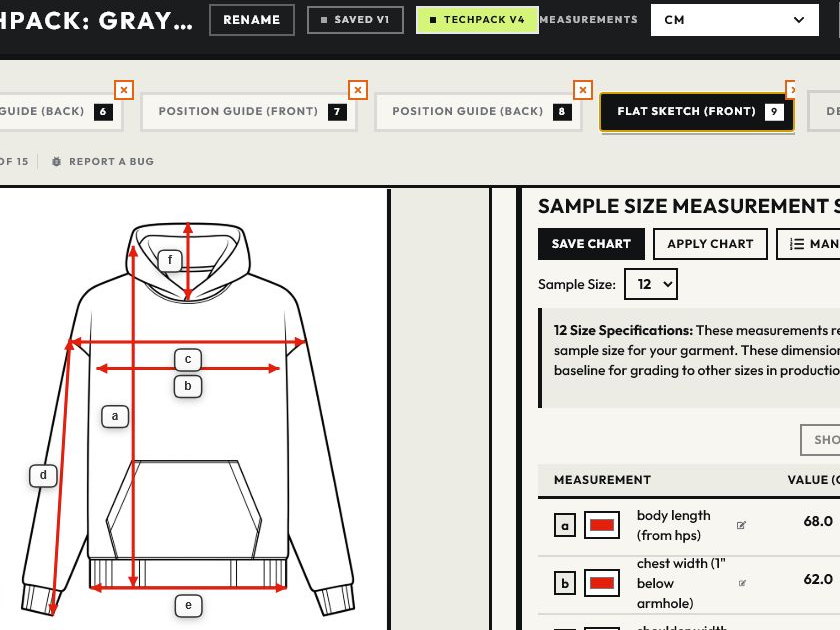
See the SVG grouping examples for the current beta's results and limitations, and the Batch Workspace walkthrough for collection setup and plan availability. Use garments from your own range to assess whether the drawing structure and shared setup fit your team's work.
When a broader PLM or 3D workflow matters
If the main problem is coordinating product records, development stages and suppliers across departments, include fashion PLM in the evaluation. That is why PLMBR is a separate choice above. A tool that drafts a tech pack does not necessarily cover those wider management requirements.
If your team already develops garments in CLO 3D, evaluate CLO-SET's Web Tech Pack in that context. Its documentation describes pulling bill-of-materials and measurement information from 3D garment data. That gives an existing 3D team a different starting point from generating a draft from a photo.
Evaluate the software on your next collection
Take a representative style and one planned revision into the trial. Use the same garment brief, size chart and material requirements in each shortlisted tool. Compare how much work it takes to complete the pack, make the revision and start the next style with the information you want to reuse.
- Drawing work: can the designer make the required garment change and keep the construction callouts consistent?
- Specification work: can the team use its own measurements, materials and construction standards without rebuilding the document?
- Collection work: which settings and assets carry into the next style, and how does the supplier receive the latest approved information?
Compare the price of the plan that covers that workflow, including seats, generation limits, exports and onboarding where needed. Include the team's editing and coordination time. A lower subscription price tells you little if each style requires substantially more manual work.
If turning garment references into working tech packs is the bottleneck, start with one of your styles in AI Tech Packs. Use the draft to assess the drawing, specifications and editing workflow before bringing in the rest of the line.
Create a tech pack from your garmentFor the document structure, see the complete tech pack guide. If you want to assemble it yourself, start with our T-shirt and hoodie templates.


